Deposits & Collecting Remainder Payments
Deposits let you take a partial payment upfront when a client books, protecting your time if they cancel last-minute.
What is a deposit?
A deposit is a partial payment — typically 20–50% of the service price — that clients pay when they book. The remainder is collected after the job. Deposits reduce no-shows and protect your time, especially for higher-value work.
Step 1: Enable a Deposit on a Service
Go to Services and open or create a service. In the deposit section, set a deposit amount. You can use a percentage of the service price or a fixed amount.
Save the service. Clients booking this service will now pay only the deposit at checkout.
Step 2: Client Books and Pays the Deposit
When a client books the service, the deposit amount is shown clearly at checkout. Stripe takes the deposit payment. The booking appears in your Bookings list with the deposit amount recorded.
Step 3: Collect the Remainder After the Job
Once the job is done, open the booking from your Bookings list. You'll see a financial summary showing the deposit paid and remainder owed.
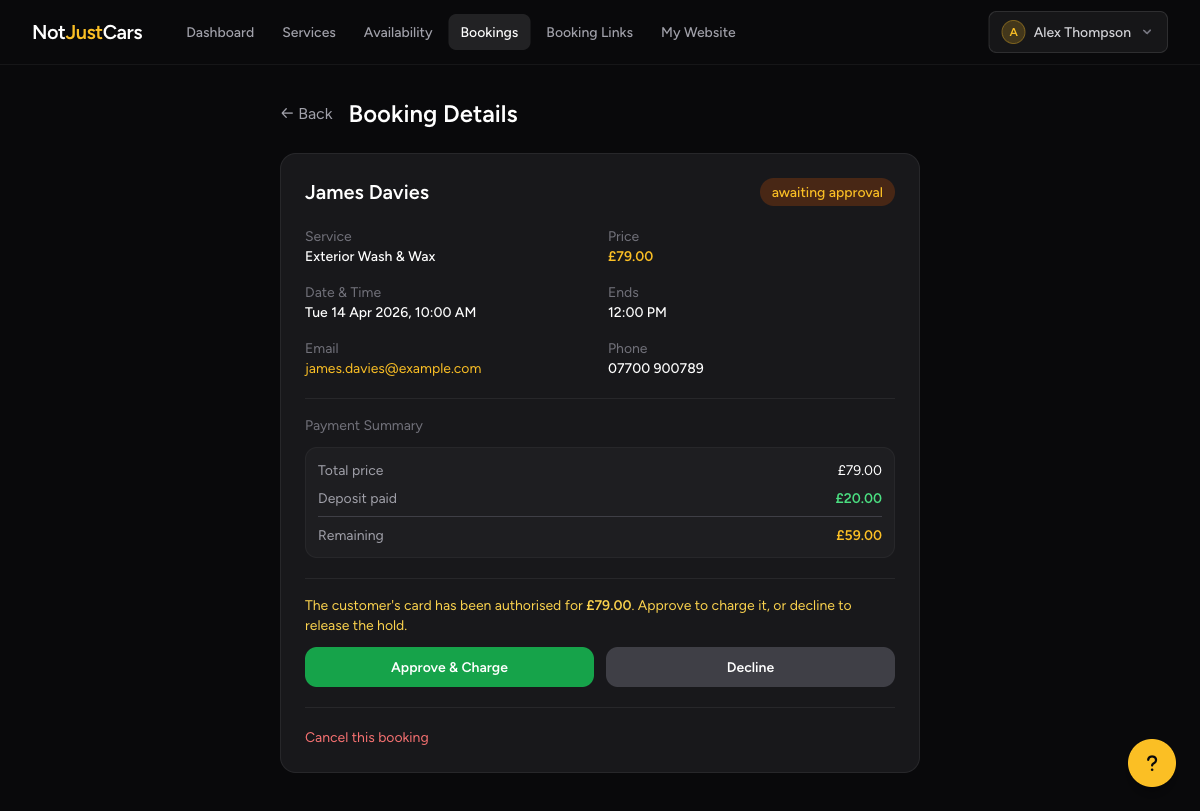
Click Collect Remainder. NotJustCars sends the client a secure Stripe payment link by email. The client pays the remainder online — no card readers or cash handling needed.
What Happens if the Client Cancels?
If a booking is cancelled, whether the deposit is refunded depends on your cancellation policy. By default, deposits are non-refundable on cancellation — this is what protects your time. You can choose to refund at your discretion by processing a refund directly from your Stripe Express dashboard.